GEPCO online bill duplicate
Lost the paper bill, or it never arrived? Get your GEPCO duplicate bill online in one minute.
Open the checker
Check online GEPCO bill — go to the Home page checker and enter your 14-digit reference number (or 10-digit customer ID).
Open your bill on the official portal
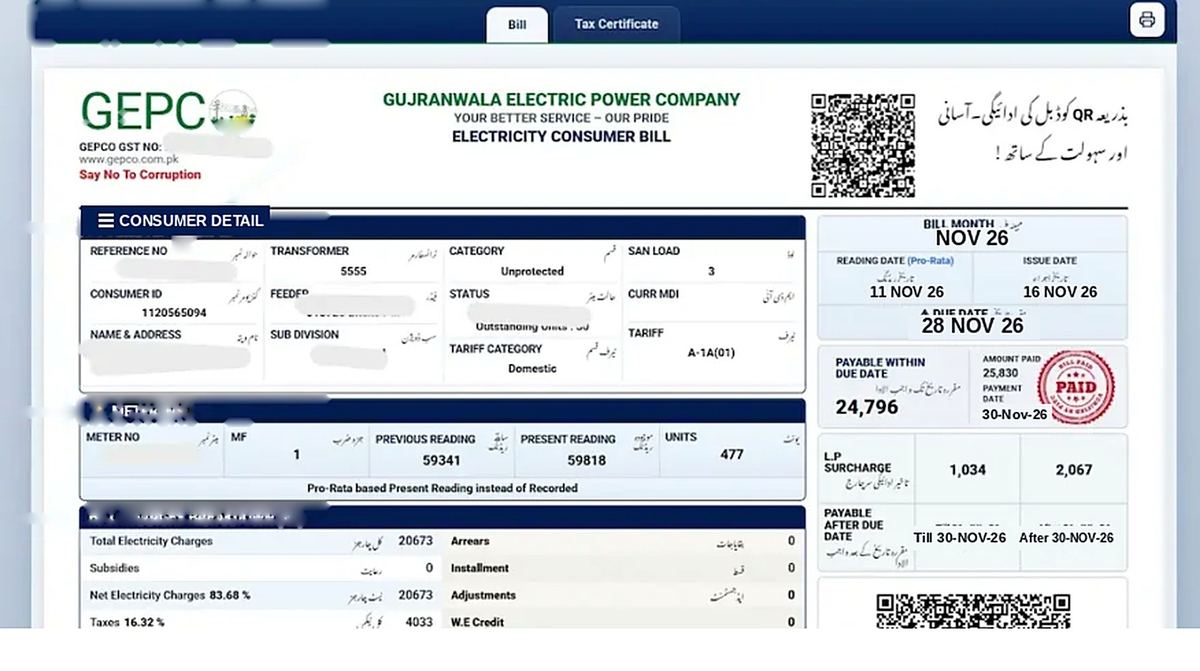
Press Search Bill — the current month's bill opens on the official GEPCO portal.
Print or save as PDF
Use the portal's print / save option. The duplicate carries the same reference number and is accepted by banks and apps exactly like the paper copy.
Pay before the due date
Pay the duplicate the same way as the original — see Payment Methods. Paying late adds the surcharge automatically.
No reference number?
Find it on any old bill, or follow the Reference Number guide. If you have no old bill at all, call 118 or visit your sub-division office with your CNIC.
Need older bills?
For last year's records, see the Bill History Download page — what the portal shows, and the office route for older copies.
What the duplicate shows
The duplicate is the same bill as the paper copy: your reference number, billing month, meter readings and units, the charges breakdown, and the due date.
It is accepted for payment everywhere the paper bill is. If any figure looks wrong, check it against your meter reading first, then call Helpline 118.