GEPCO Online Bill Check
Check your online GEPCO bill in under a minute — your number is never saved here, it opens on the official GEPCO portal.
U or R: On the official PITC form, choose U for Urban or R for Rural, as printed after your reference number on the bill.
Quick access
Check, download or pay — everything from one place.
Download Bill
GEPCO bill check online — open your current bill on the official portal and save it as PDF.
Open portal →Pay via Easypaisa
Bill Payment, then Electricity, then GEPCO, then your 14-digit reference number.
Payment guide →Pay via JazzCash
Pay Bills, then Electricity, then GEPCO, then your 14-digit reference number.
Payment guide →Helpline 118
Free, 24/7 — keep your reference number ready.
Call 118 →Pay via Bank Account
Add GEPCO as a biller in your bank app, or pay at any bank branch — your 14-digit reference number is all you need.
Payment guide →How to check GEPCO bill online
GEPCO bill online check in four steps, under a minute — all you need is an old bill.
Lost your paper bill? Get a GEPCO online bill duplicate.
Paying? See GEPCO online bill payment.
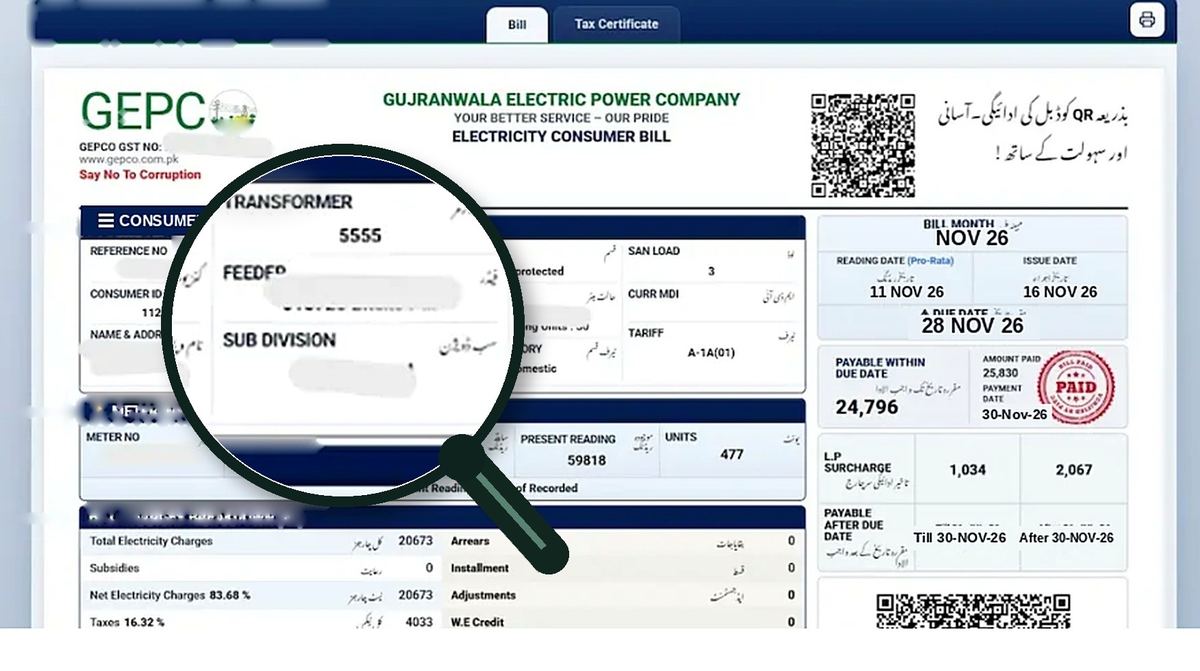
Find your reference number
On any old GEPCO bill — 14 digits at the top, near your name and address. The 10-digit customer ID works too. Full guide: Find Reference Number.
Enter it in the checker
Type it above and press Search Bill — your bill opens on the official portal. No account needed.
Read the key figures
Payable amount, due date, units and billing month. Every line of the bill is explained on the Reference Number page.
Download, print or pay
Save it as a PDF or print it, then pay by bank app, Easypaisa, JazzCash or ATM before the due date.
Where the number sits on your bill
Tip: photograph one bill — the reference number never changes.
All GEPCO pages
Every GEPCO service and guide on its own page — pick what you need.
Bill Calculator
Estimate next month's bill from your units, category and load.
Open page →Duplicate Bill
Lost the paper bill? Download or print this month's duplicate.
Open page →Bill History Download
Your last 6–12 months of bills — the honest way to get them.
Open page →Tariff & Slabs
Per-unit rates for protected, unprotected and lifeline consumers.
Open page →Payment Methods
Bank apps, Easypaisa, JazzCash, ATM, bank branch and Pakistan Post.
Open page →New Connection
How to apply for a new GEPCO meter — documents and process.
Open page →Helpline & Complaints
Wrong bill, missing bill or meter fault — call 118, free 24/7.
Open page →Find Reference Number
Where the 14 digits sit on your bill — and how to read every line of it.
Open page →FAQs
About GEPCO, contact, privacy and answers to common questions.
Open page →Areas served by GEPCO
Six districts in north-east Punjab, all on the same national tariff. See all areas on the Helpline page →
GEPCO بل آن لائن چیک کریں
اپنا GEPCO بجلی کا بل چیک کرنے کے لیے، بل کے اوپر لکھا 14 ہندسوں کا ریفرنس نمبر درج کریں۔ آپ چند سیکنڈ میں موجودہ بل، قابل ادائیگی رقم اور آخری تاریخ دیکھ سکتے ہیں، اور ڈپلیکیٹ بل پرنٹ کر سکتے ہیں۔ یہ سروس بالکل مفت ہے اور کسی اکاؤنٹ کی ضرورت نہیں۔
ریفرنس نمبر ہر بل کے اوپر نام اور پتے کے قریب لکھا ہوتا ہے۔ یہ 14 ہندسوں کا ہوتا ہے اور کبھی نہیں بدلتا۔
What your GEPCO bill includes
Your GEPCO bill is more than the cost of electricity. Here is what each part means:
- Consumer information: your name and service address. Check these first so the bill belongs to your property.
- Reference number (14 digits): your connection's unique number, printed at the top of the bill. It never changes.
- Customer account number: a second identifier used for office visits, complaints and services.
- Billing month: the month the charges are for. Check it matches the right consumption period.
- Issue date and due date: the bill was generated on the issue date; pay by the due date to avoid the late surcharge (usually 10%).
- Previous and current meter readings: units consumed are the current reading minus the previous reading. Compare with your meter.
- Monthly electricity consumption: units (kWh) used in the billing month. This decides most of your bill.
- Previous outstanding amount: unpaid amounts from earlier bills, carried forward as arrears.
GEPCO coverage area
GEPCO supplies electricity to six districts of north-eastern Punjab:
- Gujranwala (and Wazirabad): Gujranwala city, Kamoke, Nowshera Virkan, Wazirabad — GEPCO office Gujranwala
- Sialkot: Sialkot city, Daska, Sambrial, Pasrur — GEPCO office Sialkot
- Gujrat: Gujrat city, Kharian, Lalamusa, Sarai Alamgir — GEPCO office Gujrat
- Narowal: Narowal city, Shakargarh, Zafarwal — GEPCO office Narowal
- Hafizabad: Hafizabad city, Pindi Bhattian — GEPCO office Hafizabad
- Mandi Bahauddin: Mandi Bahauddin city, Phalia, Malakwal — GEPCO office Mandi Bahauddin
Living close to the GEPCO boundary? Lahore and Sheikhupura are served by LESCO, Jhelum and Rawalpindi by IESCO, and Sargodha and Chiniot by FESCO. Always use the checker for the company name printed on your bill.
Check other DISCO bills
Many GEPCO households also pay other utility bills. You can check them on the official PITC portal at bill.pitc.com.pk, which covers all ten ex-WAPDA distribution companies: GEPCO, LESCO, IESCO, FESCO, MEPCO, PESCO, HESCO, SEPCO, QESCO and TESCO. Always use the checker for the company name printed on your bill.